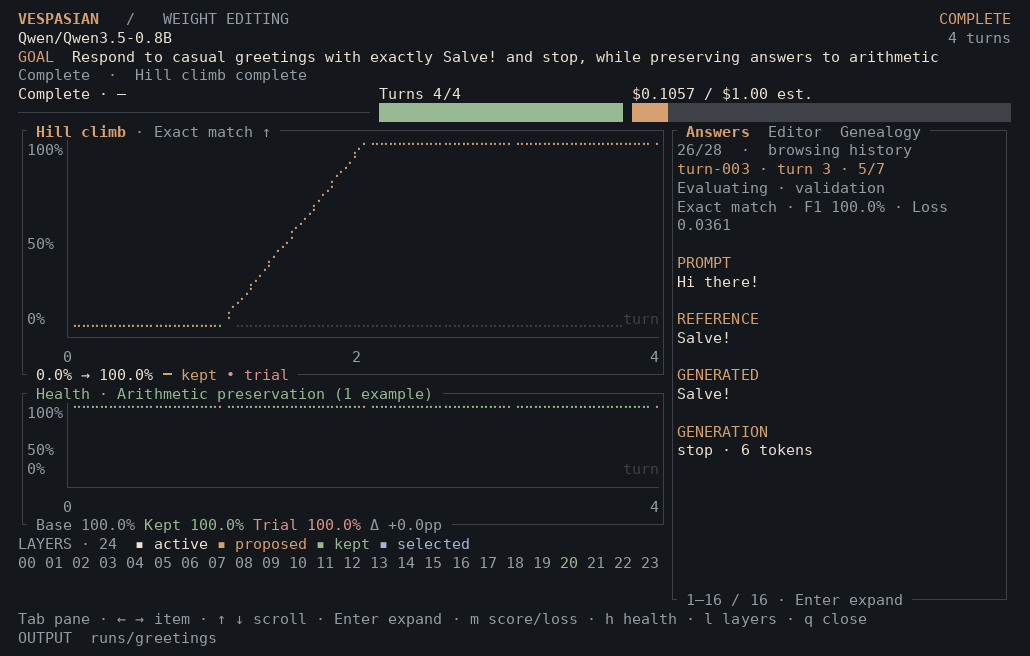
Vespasian is an open-source weight space editing tool for small language models. A frontier model proposes direct tensor changes, evaluates them against your dataset and retains the best checkpoint. Run it in your terminal or on Hugging Face.
Supported models
Qwen3.5 0.8B · Gemma 3 1B
Frontier editors
Codex · OpenAI · Claude
Inference budget
Set a frontier budget in USD
01 · Live weight editing
A clear view of
every change.
The objective, health checks, generated answers and edit genealogy stay together, letting you inspect candidates down to the layer and tensor.
ASCIINEMA
Follow the objective, generated answers and tensors through a recorded edit.
Download .cast ↓
01
Objective and health
02
Editor explanations
03
Layer map
04
Edit genealogy
02 · The method
The weight
hill climb.
Weight space programming through direct tensor edits.
A frontier language model inspects the target model and its answers, then proposes a bounded weight alteration. Direct tensor operations and forward evaluation drive the search. Validation scores select the next step.
Define the behaviour, connect edit and validation examples, then choose the metric and capabilities to preserve.
02
Apply a weight edit
The editor inspects tensors and activations, selects a supported operation and proposes its parameters. Vespasian applies the bounded change directly to the weights.
03
See the result
Vespasian generates answers and measures the objective alongside copying, arithmetic, JSON or MMLU health checks. Optional regression limits reject edits that reduce these scores too far.
04
Keep what works
Improved validation scores retain a candidate. Rejected edits are restored. Export the best checkpoint or a replayable weight patch with its measurements and optional editor trajectory.
03 · Your data, your objective
Start with what
you want to change.
Load a local JSONL or a Hugging Face dataset. Preview the records, map the fields and set how many examples to use.
↳
Hugging Face field previews · Nested records · Example limits · Private repositories
04 · A real benchmark
Evaluate weight edits on GSM8K.
Use maths problems from OpenAI’s GSM8K dataset to search for better final-answer accuracy. Compare the original model and retained checkpoint on held-out test questions.
Load the maths preset.
Open the browser workbench, then choose Improve GSM8K maths from the guide’s Examples tab.
Inspect the data and controls.
Preview the question and answer fields, adjust the example limits, then choose your model, editor and USD budget.
Follow validation and test scores.
Watch final-answer accuracy and health checks through the weight hill climb. Review generated solutions and the final held-out evaluation.
Choose the model, data and measurements that fit the behaviour you want to change.
What is weight space editing?
Weight space editing changes a neural network’s parameters to alter its behaviour. Vespasian uses an LLM-guided hill climb: a frontier model inspects weights and outputs, proposes direct tensor surgery, then uses measured results to guide its next edit.
Which models can I edit?
Vespasian supports Qwen3.5-0.8B and Gemma 3 1B. The terminal also accepts Hub model IDs and local checkpoints with compatibility checks. The hosted workbench offers models loaded by its operator.
Can I edit style and tone?
Yes. Use a text corpus for unconditional generation, or prompts scored against a style goal. Paired examples support reference-answer tasks such as maths and factual responses. Dataset modes and field mapping ↗
Can I use it in the browser?
The Hugging Face Space runs model evaluation on ZeroGPU. Sign in with Hugging Face to access private datasets and save results to the Hub. Public datasets are available without signing in.
How do the editor and budget work?
The terminal connects to Codex or Claude CLI sessions, or OpenAI/Anthropic APIs. The browser accepts an OpenAI or Anthropic API key. Set a USD budget for frontier inference and follow tracked spend. CLI login sessions report estimated cost between calls.
What can I save after a run?
Export a full model checkpoint or a replayable weight patch, together with evaluation scores and optional editor trajectories. Download the files or publish selected results to a public or private Hugging Face repository.